

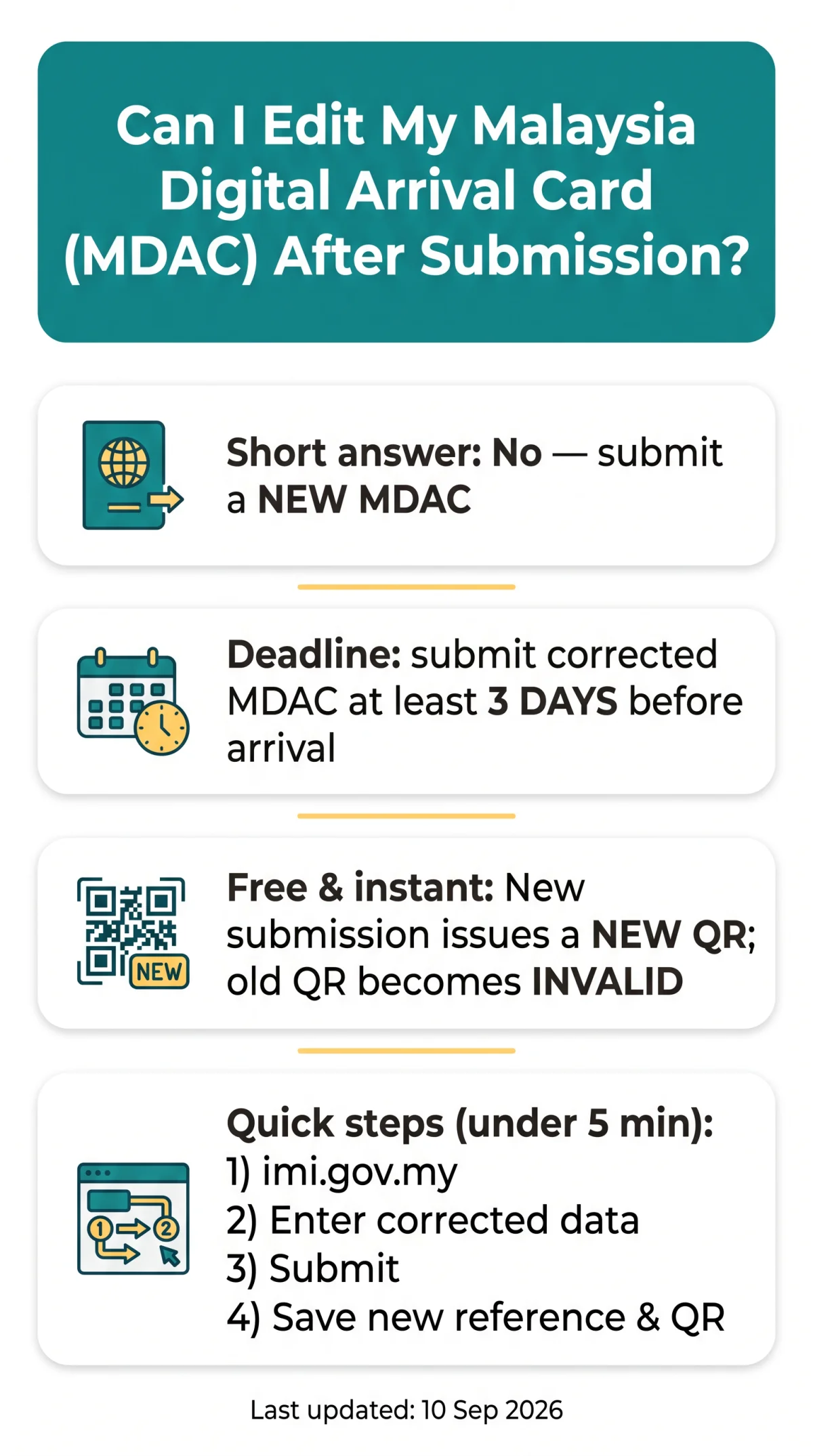
No, you cannot directly edit a submitted Malaysia Digital Arrival Card (MDAC). There is no edit button on the confirmation page. To correct any mistake such as a wrong passport number, name, or arrival date, you must submit a new MDAC form through the online portal (imi.gov.my). Submitting an MDAC, including any resubmissions, is completely free of charge. Ensure you file the corrected form at least 3 days before your date of arrival in Malaysia.
Last updated: 10 September 2026. This is an independent travel information portal, not affiliated with the Malaysian government or Immigration Department. All guidance is based on official public sources at imi.gov.my and verified against the portal on 8 September 2026.
Can You Edit MDAC After Submitting? – The Short Answer
The Malaysia Digital Arrival Card (MDAC) online portal offers no edit button on the confirmation page. Correcting a submitted MDAC requires filing a completely new form, which is free of charge.
A 2025 report on referenced a PIN-based edit option on a dedicated page, but as of our last check in September 2026 this feature is not reliably available; resubmission is the confirmed method for fixing errors in passport details, flight numbers, or accommodation addresses.
How to Correct MDAC Mistakes: Step-by-Step Resubmission Guide
Go to imi.gov.my
Start a new Malaysia Digital Arrival Card (MDAC) form.
Enter corrected data
Use the same passport number, watching for O vs 0 and I vs 1 confusion.
Submit the form
Complete and submit the new MDAC form.
Note the new reference number
Record the new reference number from your submission.
Download or screenshot the new confirmation
Save the new confirmation with the fresh QR code. The previous QR code becomes invalid.
In our testing of the MDAC resubmission process in 2026, filing a new form with the same passport number took under 5 minutes and instantly invalidated the old QR code. Resubmission with the same passport number auto-supersedes the earlier record.
| Error Type | Resubmission Required? | Severity |
|---|---|---|
| Passport number | Yes | Critical |
| Full name | Yes | Critical |
| Nationality | Yes | Critical |
| Date of birth | Yes | Critical |
| Flight number | Recommended | Medium |
| Arrival date | Yes | Critical |
| Accommodation address | Recommended | Low |
MDAC Resubmission Deadline – How Long Do You Have?
The Malaysia Digital Arrival Card (MDAC) must be submitted at least 3 days before the date of arrival, meaning any correction must be filed within that minimum window or earlier. If you spot an error more than 3 days before departure, submit a new form through the portal at imi.gov.my.
Can you still fix MDAC after arriving in Malaysia? Once you have entered Malaysia, MDAC details cannot be changed online. Any discrepancy must be explained directly to an Immigration officer at the counter with supporting documents.
How to Verify Your MDAC Is Correct After Resubmission
After resubmission, log in to imi.gov.my with your passport number and new reference number to confirm the updated Malaysia Digital Arrival Card (MDAC) record is active and a fresh QR code has been issued.
Visit imi.gov.my
Go to the official portal.
Enter your details
Provide your passport number and the new reference number from your resubmission.
Confirm the updated record
Check the status indicator shows the updated record and a new QR code has been issued.
A digital copy of the corrected MDAC on your phone is sufficient at the checkpoint, though a printed backup is recommended.
What If You Cannot Fix MDAC Before Your Flight?
At the Malaysian immigration counter, present your passport, booking confirmation, flight details, and the erroneous Malaysia Digital Arrival Card (MDAC) screenshot, then explain the error so the officer can update details manually. Suggested script: “I spotted an error in my MDAC regarding my [passport number / arrival date]. I have my confirmation here for reference.”
UK citizens enjoy visa-free entry to Malaysia (up to 90 days), but completing the Malaysia Digital Arrival Card remains a separate mandatory requirement regardless of visa exemption.
Escalate via the Ministry of Foreign Affairs: +603-8000 8000 / @kln.gov.my. After-hours Duty Officer: +603 8887 4570 / [email protected]. Portal: imi.gov.my.
Ministry of Foreign Affairs Malaysia, Wisma Putra, No 1, Jalan Wisma Putra, Precinct 2, 62602 PUTRAJAYA.
MDAC Troubleshooting – Common Technical Errors During Resubmission
Common Malaysia Digital Arrival Card (MDAC) portal errors include “passport number already used” (try incognito mode), session timeouts (restart the form), and “reference number not found” (re-check for typos).
| Error Message | Solution |
|---|---|
| “Passport number already used” | Clear cache or use incognito mode; new submission overwrites. |
| Session timeout | Restart the form in a new browser session. |
| “Reference number not found” | Re-enter carefully; check for typos (O vs 0, I vs 1). |
| Browser compatibility issues | Use the latest Chrome, Firefox, or Safari. |
| Page not loading | Try a different device; desktop recommended over mobile. |
MDAC Correction and Resubmission FAQ
Can I edit my Malaysia Digital Arrival Card after submission?
No. There is no edit button on the confirmation page. Submit a new MDAC form through the online portal (imi.gov.my); the new submission automatically supersedes the old record.
How do I correct mistakes on a submitted MDAC?
Log in to imi.gov.my, complete a new form with the same passport number and corrected details; the new submission supersedes the old one.
Is there a time limit for correcting MDAC errors?
Yes. The MDAC must be submitted at least 3 days before your date of arrival in Malaysia. File a corrected new submission within that window or earlier.
Can I submit a new MDAC to replace a wrong one?
Yes. A new submission with the same passport number automatically supersedes the earlier record on the portal.
Will I receive a new QR code after correcting my MDAC?
Yes. A fresh QR code is issued with the new submission, and the previous QR code becomes invalid.
What should I do at immigration if I notice an error on arrival?
Bring your passport and erroneous MDAC printout or screenshot; explain the situation to the Immigration officer for manual correction.
Is resubmitting MDAC free of charge?
Yes, completely free. There are no fees for any number of MDAC submissions through the portal.
How can I check the status of my MDAC?
Visit imi.gov.my, enter your passport number and reference number, and view the status indicator to confirm your corrected record is active.
What happens if I arrive in Malaysia with incorrect MDAC details?
Expect possible delays at the counter. Explain the error to the Immigration officer with supporting documents (passport, booking confirmation) for manual correction.
Can UK citizens enter Malaysia without completing MDAC?
No. UK citizens have visa-free entry (90 days), but MDAC is mandatory for all travellers regardless of visa exemption.